
Upside: Gas & Food Cash Back
Upside Inc.Travel & Local
4.6187.88K Reviews
- Version
- 26.29.0
- Installs
- 10.00M
- Age Rating
- Everyone
Screenshots
Our Review of Upside: Gas & Food Cash Back
 Analysis by Appyee
The first-week appeal of Upside: Cash Back - Gas & Food is easy to understand: it puts offers for routine spending in one place and gives you a reason to check before paying. I find that promise most convincing when it fits a trip I was already making. The app is free, from Upside Inc., and belongs to the travel and local category, though its practical draw is everyday savings rather than planning a holiday. Its average rating is 4.5 from around 424,000 ratings, and it has over 10 million installs, so it clearly has a sizable audience. Those figures establish popularity, not a guarantee that every nearby offer will suit your habits.
Why the first week feels rewarding
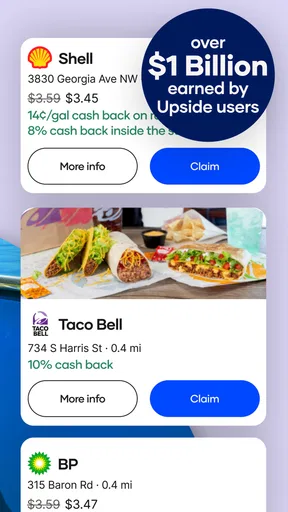
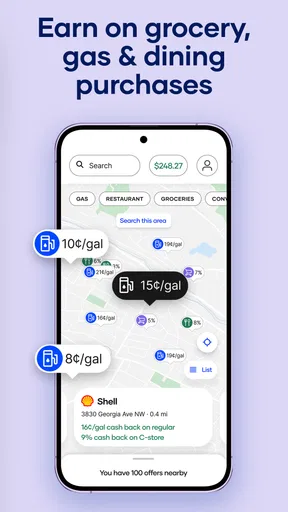
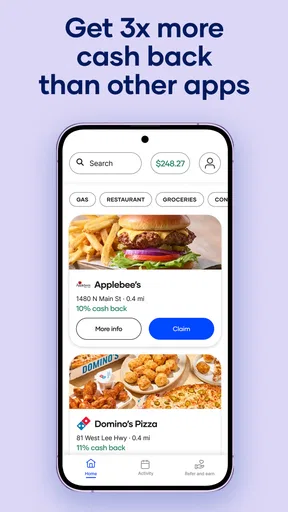
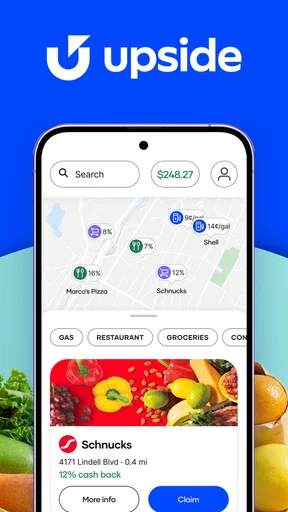
The early routine is straightforward: open the map, look at nearby offers, claim one that suits your plans, then follow the app’s instructions for making and documenting the purchase. That sequence can feel satisfying because it turns a familiar errand into a small, deliberate choice. I’d use it before setting off for fuel or deciding where to stop for a meal, rather than opening it only after I have already paid. The practical difference is that the offer becomes part of the decision, not an afterthought.
There is a useful distinction between seeing an offer and deciding it is worth chasing. A nearby location is not automatically the best stop if it takes you out of your way, and a tempting reward should not persuade me to buy something I did not need. I treat the map as a comparison aid, then weigh the detour, the purchase I planned to make, and the effort of submitting proof. That small check keeps the app focused on savings rather than extra spending.
Value that has to survive the monthly routine
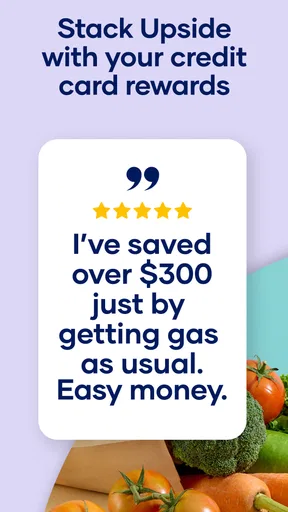
Upside’s longer-term case depends on repetition. A driver who fills up regularly or someone who often chooses among nearby restaurants has more natural chances to check offers than a person whose purchases are occasional. The benefit is not that every transaction becomes a windfall; it is that an existing habit may return some value when an eligible offer lines up with it. The store summary also points to stacking offers with existing credit- and debit-card rewards. In principle, that makes the app more appealing to someone already using a rewards card, provided the offer and payment details work for that purchase.
For a realistic weekday example, imagine I need fuel on the way home and have two convenient stations along my route. I can check the map before leaving, compare the available options with the distance I would travel anyway, and claim an offer only if the choice still makes sense. After paying, I need to keep the receipt and submit it as requested. That is a manageable habit when I’m already stopping, but less attractive if I have to make a special trip or remember paperwork long after the errand.
What ongoing upkeep actually involves
The app is not entirely passive. Checking offers takes a moment, and the receipt step means I need to remember to document a qualifying purchase. If I tend to throw receipts away immediately or routinely pay without checking where an offer applies, I may miss the very action that makes the reward possible. My practical tip is to make the check part of the errand routine: look before choosing a location, then handle the receipt while the purchase is still fresh. That is more reliable than expecting a notification to do all the remembering for me.
There is a trade-off between flexibility and attention. The app’s map and nearby-offer notifications can help me notice options, but notifications are only useful if I want them and if they arrive at a relevant time. I would use them as prompts, not as instructions to change my plans. If I’m driving, I would check before setting off or after stopping safely; no cash-back offer is worth distracting myself on the road. Someone who prefers a completely automatic card-reward setup may find the extra claim-and-receipt routine less appealing.
When the habit starts to feel tiring
The main source of fatigue is the gap between a potential reward and the small tasks needed to receive it. Choosing an offer, remembering the transaction details, saving a receipt, and waiting for verification can make a modest return feel less immediate. Receipt verification can take longer than expected, so I would not treat a newly submitted purchase as money available for a planned expense. That delay does not erase the value, but it changes how I’d think about it: a bonus to collect over time, not a reliable way to reduce today’s bill.
Another source of friction is fit. Offers vary by location and by the places I actually visit, so the app is less compelling if my regular routes have few relevant choices. It also cannot make a more expensive stop sensible just because a reward is attached. Before changing a routine, I’d compare the full cost and convenience of the alternatives rather than focusing on the cash-back figure alone. If the app repeatedly sends me toward places I would not otherwise choose, I would stop checking it so often.
Who will get the most from it
I think the best fit is someone with recurring fuel, grocery, or restaurant spending who is willing to check an offer before a purchase and complete the receipt step afterward. It may also suit a careful deal-comparer who already uses card rewards and wants to see whether an additional offer fits an ordinary transaction. The app is available for free and is rated for Everyone, which lowers the barrier to trying it, though a free download still asks for attention and account setup.
I would be less enthusiastic about recommending it to someone who rarely drives, has little choice among nearby places, dislikes keeping receipts, or wants rewards to appear without taking any extra steps. It is also not a good reason to buy more fuel, food, or restaurant meals than planned. In those situations, a straightforward card reward or simply choosing the closest suitable retailer may be more useful than maintaining another savings routine.
Getting Started with Upside
First things first, the setup process for Upside: Cash Back - Gas & Food is a breeze. Just download the app from the App Store or Google Play, create an account, and you’re good to go. Once you’re in, it’s all about finding those sweet deals. The app uses your location to show you nearby offers on gas, groceries, and even some restaurants. And let me tell you, the savings can add up quickly!
How Does It Work?
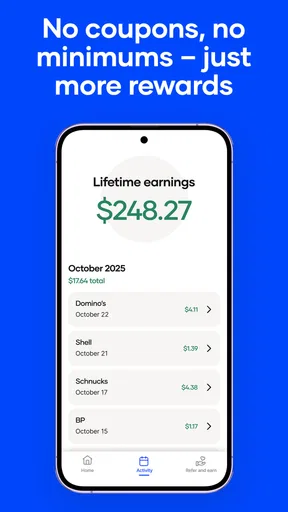
It’s pretty simple, really. When you find a deal you like, you’ll claim it and then head to the participating location. Make your purchase with a credit or debit card, and snap a photo of your receipt. The app takes care of the rest, verifying your purchase and crediting your account with cash back. It’s like being rewarded for spending money you’d be spending anyway.
A useful way to make that workflow less fussy is to decide on the offer before you reach the counter or pump. I would also check that I understand what the offer asks me to do, then keep the receipt until the purchase has been submitted. That gives me a simple answer to a common practical question: should I keep the receipt? Yes, at least until I have completed the submission process. Since verification may take time, I would also avoid assuming that a claim has already become a usable balance.
What’s in it for You?
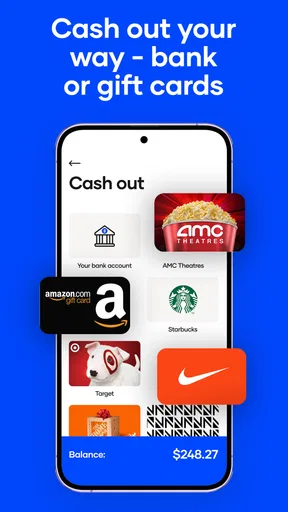
Now, let’s talk savings. With every gallon of gas or grocery purchase, you’re getting some cash back. And it’s not just pennies here and there – it can be a significant amount over time. Plus, if you’re the type who loves eating out (who isn’t?), those restaurant deals are a nice bonus. You can even hook up your PayPal account or get gift cards to your favorite places. It’s flexible and works around your lifestyle.
The sensible question is whether the cash back changes my total spending in a helpful direction. I would compare the actual stop I plan to make with the nearby alternative, not just the reward displayed in the app. If the offer fits a place I already use, it can complement a card’s own rewards; that is the stacking idea Upside promotes. But I would not assume that every transaction qualifies in the same way, or that every payment method will suit every offer. Reading the offer details before relying on it is a better habit than trying to sort out a mismatch afterward.
The User Experience
One of the things I absolutely love about the app is its user-friendly interface. Navigating through different deals is a breeze, and the map feature is super handy when you’re on the go. I also appreciate the notifications about nearby offers – it’s like having a personal savings scout!
Compared with the usual alternatives, Upside sits between a passive bank-card reward and manually hunting through separate coupons. A card reward can be easier because it may require little ongoing attention, while a coupon can be more targeted but may take extra searching before each purchase. Upside’s map is useful when location matters and I have a choice of stops; it is less useful when my route is fixed or the nearest offer creates a detour. I see it as an extra comparison layer, not a replacement for checking prices, choosing a convenient shop, or using rewards I already understand.
The developer is Upside Inc., and the current version is 10.71.0 for devices running OS 9 or later. The app launched on April 24, 2016, and its 180,000 reviews suggest many people have shared an experience with it, though an individual user’s results still depend on their area and habits. I would check that my device meets the minimum requirement before trying it, then judge the app by whether relevant offers show up along my normal routes rather than by its broad popularity alone.
People often wonder whether they need to change where they shop to benefit. My answer is no: I would only switch when the alternative is genuinely convenient and the whole purchase still makes sense. The strongest workflow is to check before an errand, choose a location I would be happy to visit anyway, and submit the proof promptly. If no suitable offer appears, I would carry on with the original plan. That keeps the app from turning ordinary errands into a constant search for a marginal deal.
Another practical question is whether it works for occasional users. It can still be worth a look if a relevant offer appears before a purchase, but the recurring value is naturally harder to notice when I rarely make the kinds of purchases it covers. I would not install it expecting every trip to produce a reward. Instead, I’d give it a fair trial across my normal routine and keep using it only if the offers and follow-through feel worthwhile. That is a better test than going out of my way during the first few days just to explore it.
Its mature presence in the category is reassuring in a limited sense, but I would still treat each offer as something to check rather than a promise of effortless savings. An average rating of 4.5 gives a broad signal that many users find value, while my own experience would hinge on local selection, the receipt process, and whether I remember to claim offers. For me, those details matter more than a high-level score because they determine whether the app earns a permanent place in an everyday routine.
However, a little heads up – sometimes the receipt verification process can take a bit longer than expected. But hey, a little patience never hurt anyone, especially when there’s money to be saved.
Final Thoughts
In a nutshell, Upside: Cash Back - Gas & Food is a game-changer for anyone looking to save money on everyday expenses. It’s straightforward, effective, and a no-brainer if you’re already spending on gas and groceries. Whether you're a frequent traveler or just someone who loves a good deal, this app has something for everyone. Give it a try and watch those savings pile up!
For me, the lasting verdict is more measured: Upside earns space when it quietly fits errands I already make, not when I reorganize my week around every offer. The first-week novelty can encourage me to check the map, but month-to-month value comes from relevant locations and a receipt habit I can maintain. If that routine feels easy and the offers fit, it is a useful extra alongside existing rewards. If I find myself chasing stops, postponing plans, or resenting the paperwork, I would uninstall it without feeling I had missed a dependable source of savings. That balance is why I’d recommend trying it to a regular local shopper or driver, while being clear that convenience and consistency matter more than enthusiasm on day one.
Privacy and Permissions
See what permissions an app requests and how it handles your data.
- Contacts
- read your contacts, modify your contacts
- Location
- approximate location (network-based), precise location (GPS and network-based)
- Camera
- take pictures and videos
- Other
- view network connections, change network connectivity, full network access, run at startup, control vibration, prevent device from sleeping
Verdict
Strengths of Upside: Gas & Food Cash Back
- Easy cashback on gas and food expenses.
- User-friendly interface with intuitive navigation.
- Regular updates with new deals and offers.
- Supports a wide range of retailers.
- Quick redemption process for earned cash.
Limitations of Upside: Gas & Food Cash Back
- Limited availability in certain regions.
- Occasional app crashes during use.
- Cashback can take time to process.
- Some offers have complex terms.
- Notifications can be overwhelming.
Similar Picks in This Category
View All
Google Maps
Google LLC3.4

Google Maps Go
Google LLC4.1

Booking.com: Hotels & Travel
Booking.com Hotels & Vacation Rentals4.8

Google Earth
Google LLC3.8

Skyscanner Flights Hotels Cars
Skyscanner Ltd4.8

trivago: Compare hotel prices
trivago N.V.4.4
Frequently Asked Questions
What is Upside: Cash Back - Gas & Food, and how does it work?
Upside: Cash Back - Gas & Food is a mobile application designed to help users earn cash back on purchases at participating gas stations, restaurants, and grocery stores. Users simply need to check in at the location through the app, make a purchase, and then submit a photo of the receipt to earn cash back. The app partners with various retailers to offer these deals, making it an effective way to save money on everyday expenses.
Is Upside: Cash Back - Gas & Food available in my area?
The availability of Upside's cash back offers depends on your location and the participating businesses in your area. The app is continuously expanding its network, so it's best to check within the app to see the local offers available to you. You can also enable location services to receive notifications about nearby deals.
Are there any fees associated with using Upside?
Upside: Cash Back - Gas & Food does not charge users any fees to download or use the app. However, users are encouraged to read the terms and conditions carefully, as some offers may have specific requirements or exclusions. The cash back earned is free, but it’s important to follow the process outlined in the app to ensure receipt of rewards.
How do I redeem the cash back I earn on Upside?
Users can redeem their cash back directly through the Upside app. Once you've accumulated enough cash back, you have the option to cash out via PayPal, a bank account, or digital gift cards. The process is straightforward, but it’s important to ensure your account details are correct to avoid any delays in receiving your funds.
Is my personal information safe with Upside?
Upside takes user privacy and data security seriously. The app uses encryption and secure methods to protect personal information. While using Upside, users are required to provide location data and receipt images, which are stored securely. It's always a good practice to review the privacy policy to understand how your data is being used.
